
What every lot really earns you
Car boot sales, bundles, clearance stock: you buy in bulk and resell piece by piece. Alraune shares the lot price between the items, tracks each sale and shows your real margin.
- 14-day free trial
- No credit card
- Data hosted in Europe
Your real margin, on every sale
You record the sale. Fees, shipping and the share of the purchase price come off line by line: the margin appears, and the month's figures follow.
Animation: a denim jacket sold for €32.00 on eBay. Platform fee €3.20, shipping and packaging €0.80, share of the purchase price €7.50: the margin on this sale is €20.50. On the dashboard, the month's margin on sales goes from €331.74 to €352.24.
Scenes recreated from the app, with made-up data.
The Reseller account, screen by screen
Screenshots of the demo: an imaginary reseller with a year of trading.
Example with made-up data and the French rules (Urssaf…). In your country, you enter your own tax rules in Settings → My tax rules.
Your regular buyers, and what they earned you
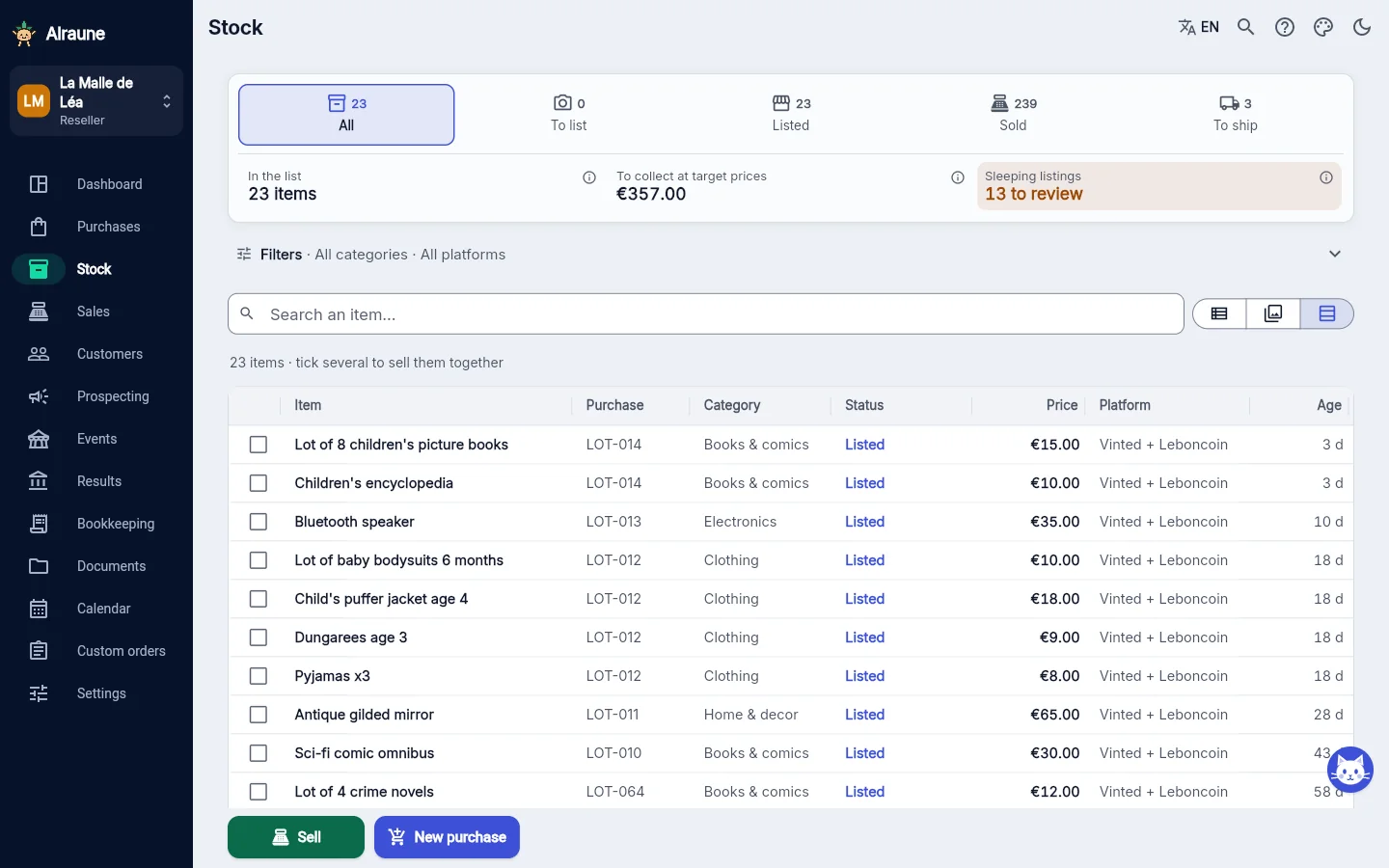
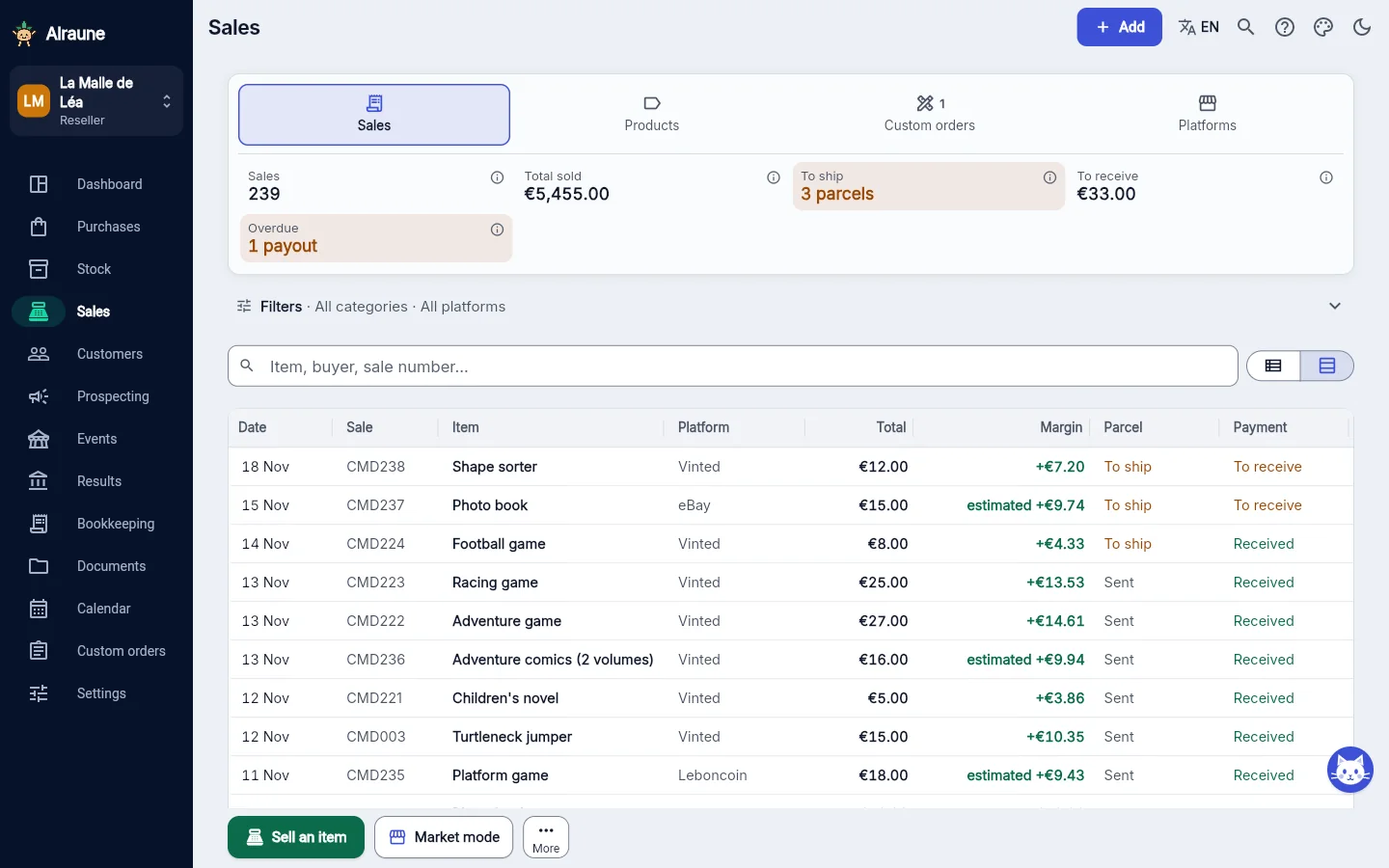
On a sale, the client is optional: note their name or username and the sale is filed in their record. Records can also be created from the buyers already noted on your sales. Each one shows their purchases, the total bought, their average basket (what they spend on average per order) and “Your margin”: what their purchases earned you.
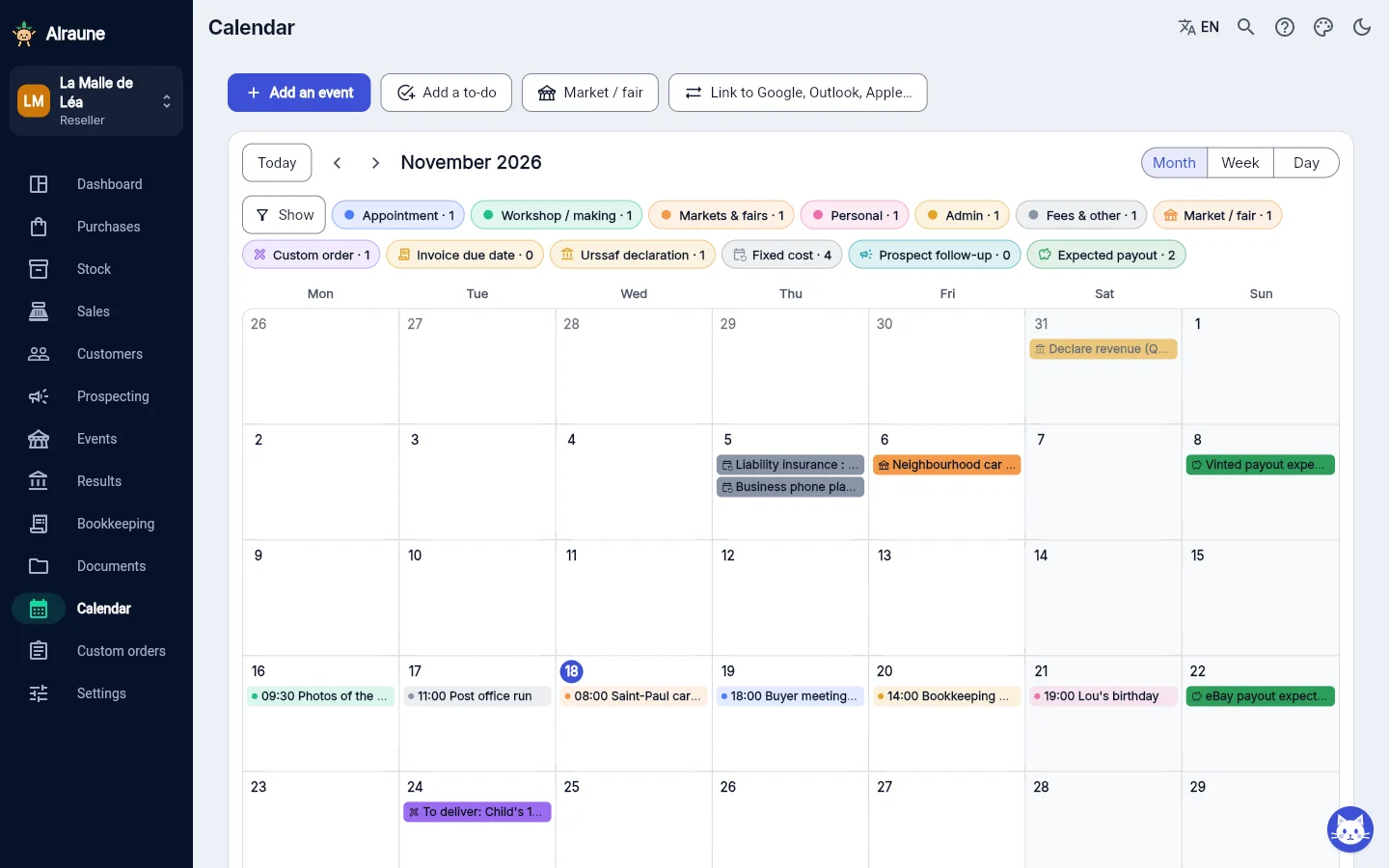
A buyer asks you for a specific item? The custom order follows its steps: requested, being prepared, ready, delivered. The deposit counts on the day you receive it, delivery records the sale with the real purchase price of the items delivered, and the promised date appears in the calendar and on the client record.

Built for people who buy to resell
From the bargain to the parcel, without a spreadsheet.
One lot, many sales, one margin
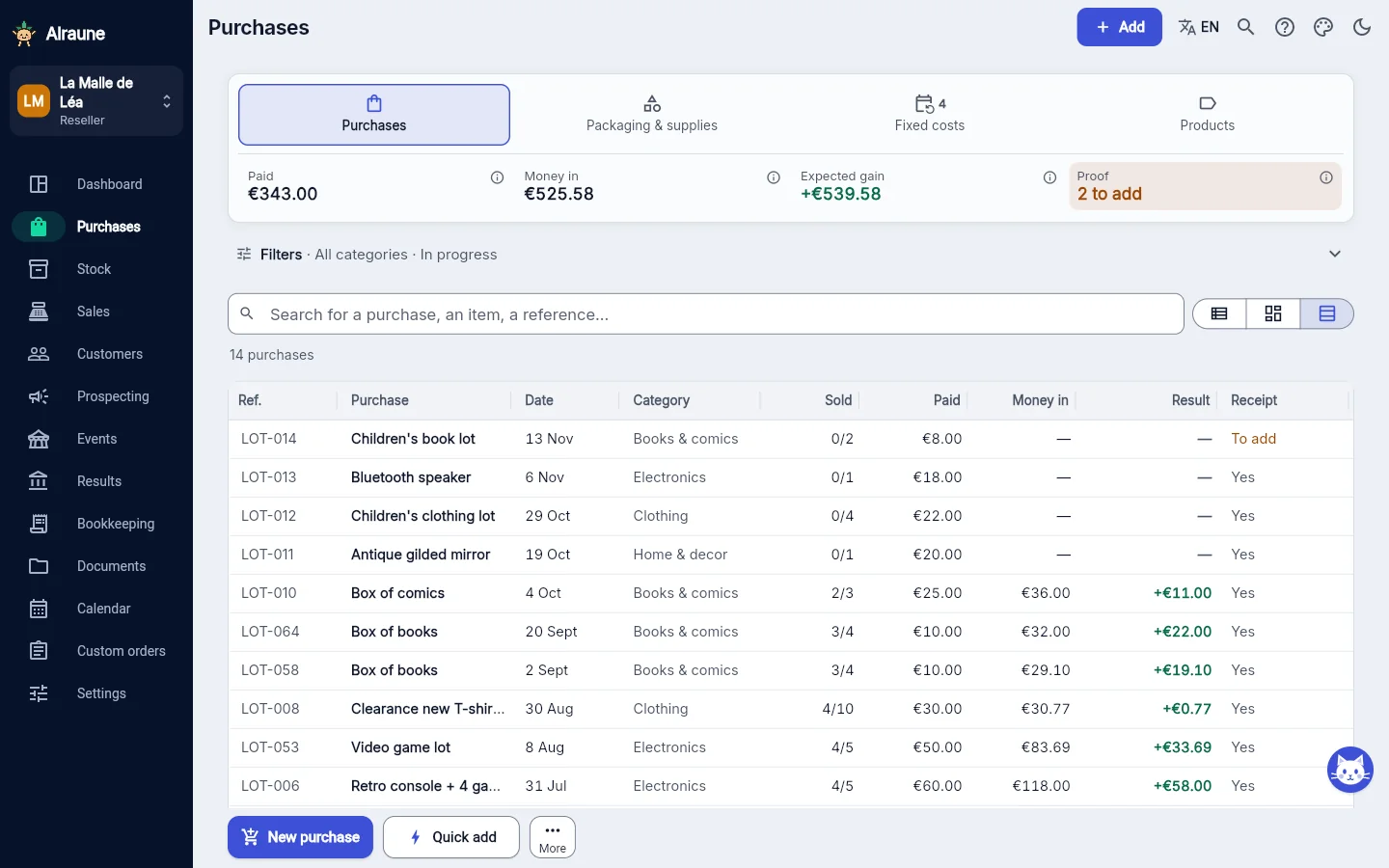
The lot price is shared between the pieces according to their value. Follow the lot to the end: sold, money received, still to recoup, then "Earned on this purchase". While pieces are left, the margin on each sale is marked "estimated".
Several platforms, no double selling
When you record a sale on a platform, the item disappears from your stock everywhere it was listed online. Listings that aren't selling are flagged.
Prices backed by your sales
Each purchase has its margin target, and you see your floor price (the price below which you stop earning what you aim for).
Quick add and receipts
A photo, a price, done. Scan a book's barcode and the title fills in by itself. Receipts are attached to each purchase.
Your categories, big and clear
Sort your things the way you think (clothes, shoes, video games, books…) with sub-ranges to go further. Tap a tile to see only that category.
Packaging and parcels
Envelopes and boxes bought in bulk: their cost is counted with every shipment. Parcels stay in "To ship" until they leave.
Your floor price at the right time
When you list: what the item cost you, the minimum price for your target margin and the average price you have achieved so far. Reference points only: the price is yours to set.
A colour-coded calendar
Car boot sales, meet-ups with buyers and deadlines in one place. A link you paste once shows it in Google, Outlook or Apple Calendar.
The extras beyond the basic menu are included in your account: "Equipment", "Returns and disputes" and "Customer searches". You switch them on in the settings, at no cost. See the extras you can switch on
Simple to use, one step at a time
What you do most often with the Reseller account, and what it takes.
One lot, several items
You enter the purchase once, then one line per item with the price you are aiming for. The price you paid is shared out between the items for you.
Selling: 3 taps
In Stock: “Sell”, the item, “Save the sale”. The listed price, the platform and the date are already filled in, and fees are worked out from your settings.
In a hurry at a car boot sale?
“Quick add”: the price paid is enough, the photo and the name are optional. You fill in the rest later.
Tapped the wrong thing?
After a sale or a purchase, “Undo” stays on screen for 6 seconds.
Questions from resellers who are just starting out
New to reselling: where do I start in the app?
Create your account (14 days free, no credit card), choose “Reseller” and tick the platforms you sell on, then record your first purchase: a lot, the price you paid and the items you plan to resell. The guided tour and the “Getting started” checklist show you what comes next. Getting started with Alraune
I don't know my platform's fees: is that a problem?
No. Leave 0 when you add the platform and fill it in later: a “Platform fees to check” reminder will prompt you, and the fees can still be changed on each sale. Yours are shown in your account on the platform; the values suggested by default are only a guide. Everything is set in Sales → Platforms, with a worked example that shows what you get. Fees and rules of each platform
I already use a spreadsheet: do I lose everything?
No. Your past sales import from your Excel, LibreOffice or CSV file: columns are recognised, a summary shows before you confirm, and the import can be undone in one go if you made a mistake. The sales keep their date and count in your results. Your current stock imports too, as a CSV. Importing your spreadsheet, step by step
Do my Vinted or eBay sales come in on their own?
No: Vinted, eBay and Leboncoin are not connected, so you record those sales yourself, in a few seconds from the item. Your past sales import from a file you choose. WooCommerce and Shopify are tools for your own online shop: if you have one, its orders can come in automatically.
Does the app tell me what price to sell at?
It gives you reference points, not a price to stick to: when you list an item, you see what it cost you, your floor price for your target margin and the average price you have already got for it. The final price is yours to set. Free resale margin calculator
Do my photos take up a lot of space?
Very little: every photo you add is shrunk automatically, sharp and readable, and its GPS location is removed. In Settings → Backup and data, “File storage” shows how much you're using and lightens older photos in one tap.
See a reseller account after a year
Made-up data, click around: nothing is saved.